Tutorial: 2D Geometry - Polar vs. Cartesian
- Goal: Teach coordinate transformations and metrics in 2D Euclidean space.
- Key Symbols: Manifold
:M, Charts:Cart,:Polar. - Verification: Metric transforms as $g_{i'j'} = J^i{}_{i'} J^j{}_{j'} g_{ij}$.
- Prerequisites:
XAct.jl,Plots.jl,LinearAlgebra.
This tutorial introduces foundational concepts in differential geometry using a familiar 2D Euclidean space. We will define the Euclidean metric in Cartesian coordinates, transform it to Polar coordinates, and calculate the resulting Christoffel symbols.
1. Setup
If running on Google Colab or a fresh environment, install the required packages first.
# Uncomment the lines below if running on Google Colab:
# using Pkg
# Pkg.add(url="https://github.com/sashakile/XAct.jl.git")
# Pkg.add("Plots")
2. Setup
Load the required modules.
using XAct
using Plots
using LinearAlgebra
`XAct.jl` maintains a global registry of manifolds and tensors. If you re-run
definition cells (like `def_manifold!`) without calling `reset_state!()`,
you will get a "Symbol already exists" error. Always include `reset_state!()`
at the start of your exploration.2. Define the Manifold and Charts
We start by defining a 2D manifold $R^2$ with abstract indices.
reset_state!()
M = def_manifold!(:M, 2, [:a, :b, :c, :d, :r, :th])
@indices M a b c d r th
Define two coordinate charts:
- Cartesian ($x, y$)
- Polar ($r, \theta$)
def_chart!(:Cart, :M, [1, 2], [:x, :y])
def_chart!(:Polar, :M, [1, 2], [:r, :th])
ChartObj(:Polar, :M, [1, 2], [:r, :th])3. Define the Metric
In Cartesian coordinates, the Euclidean metric is simply $\delta_{ij} = \text{diag}(1, 1)$.
def_metric!(1, "g[-a,-b]", :CD)

# Set the components of the metric in the Cartesian basis.
set_components!(:g, [1 0; 0 1], [:Cart, :Cart])
CTensorObj{Int64, 2}(:g, [1 0; 0 1], [:Cart, :Cart], 0)4. Visualization: Coordinate Grids
Let's visualize how the Cartesian grid transforms into the Polar grid. This helps build intuition for why the metric components change in different coordinate systems.
function plot_grids()
    p = plot(aspect_ratio=:equal, title="Coordinate Transformation: Cartesian → Polar",
             xlabel="x", ylabel="y", legend=false)

    # Plot radial lines (constant theta)
    for θ in range(0, 2π, length=13)
        rs = range(0, 2, length=10)
        xs = rs .* cos(θ)
        ys = rs .* sin(θ)
        plot!(p, xs, ys, color=:blue, alpha=0.3)
    end

    # Plot circles (constant r)
    for r in [0.5, 1.0, 1.5, 2.0]
        θs = range(0, 2π, length=100)
        xs = r .* cos.(θs)
        ys = r .* sin.(θs)
        plot!(p, xs, ys, color=:red, alpha=0.5)
    end

    return p
end

plot_grids()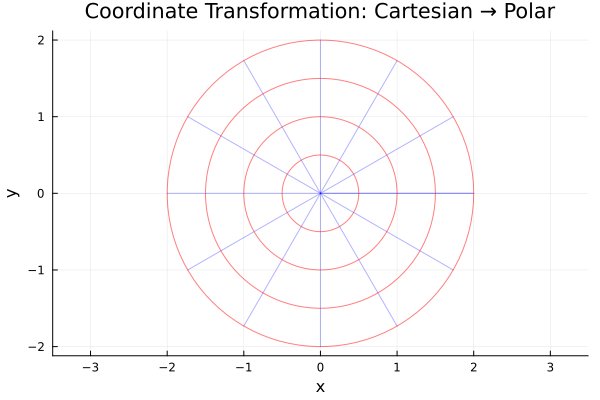
5. Computing the Metric in Polar Coordinates
To transform to Polar coordinates, we need the Jacobian matrix $J^i{}_{j'}$ representing the partial derivatives $\frac{\partial x^i}{\partial x^{j'}}$.
\[x = r \cos(\theta)\]
\[y = r \sin(\theta)\]
The Jacobian is: $J = \begin{pmatrix} \cos(\theta) & -r \sin(\theta) \\ \sin(\theta) & r \cos(\theta) \end{pmatrix}$
We can calculate the metric components in the Polar basis at a specific point using the transformation rule $g_{i'j'} = J^i{}_{i'} J^j{}_{j'} g_{ij}$.
function polar_jacobian(r_val, th_val)
    [cos(th_val) -r_val*sin(th_val);
     sin(th_val)  r_val*cos(th_val)]
end

# Calculate at (r=2, theta=pi/4)
r_val = 2.0
th_val = pi/4
J = polar_jacobian(r_val, th_val)
g_cart = [1 0; 0 1]
g_polar = J' * g_cart * J

println("Metric in Polar coordinates at (r=$r_val, θ=$th_val):")
g_polar
2×2 Matrix{Float64}:
1.0 0.0
0.0 4.0The metric in polar coordinates is $ds^2 = dr^2 + r^2 d\theta^2$, which matches the $\text{diag}(1, 4)$ result above for $r=2$.
6. Metric Determinant and Volume Form
The determinant of the polar metric is $\sqrt{|g|} = r$. This is the familiar factor in polar integration: $dA = r dr d\theta$.
det_g = det(g_polar)
println("Square root of metric determinant (r): ", sqrt(det_g))
Square root of metric determinant (r): 2.0Key Takeaways: 2D Transformations
This tutorial demonstrated:
- Defining a 2D manifold and multiple coordinate charts.
- Setting tensor components in a specific basis.
- Visualizing the relationship between coordinate systems.
- Transforming the metric and calculating geometric invariants.
Next Steps
- 3D Geometry: Extend these concepts to 3D in Curvilinear Coordinates.
- Curvature: Explore intrinsic curvature in The 2-Sphere.
- Core Guide: See the Typed Expressions (TExpr) guide.